
Content model reference
Commerce Components
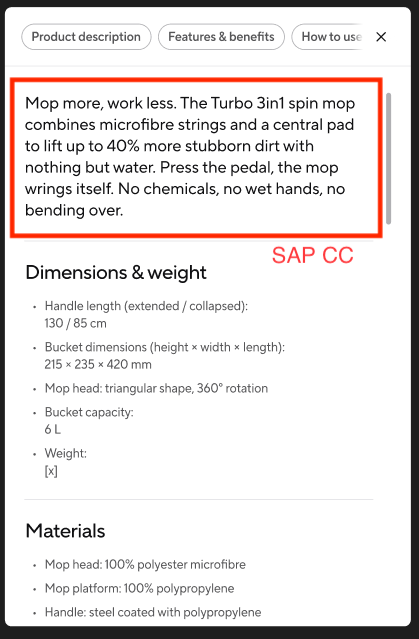
These components only exist on product detail and product listing pages. They sit next to data that comes from SAP Commerce Cloud – product information, prices, availability and the product grid itself are not maintained in Contentful.
1. PDP Accordion
Name in Contentful: 🛒 PDP Accordion Content type ID: pdpAccordion Entry title: title
Specification:CS-176 (Vileda QA on S1)
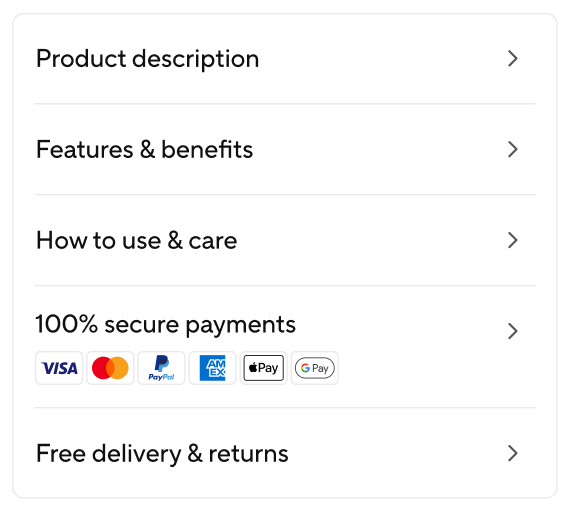
Design:Product description · Features & benefits · How to use · Payment · Delivery & Returns
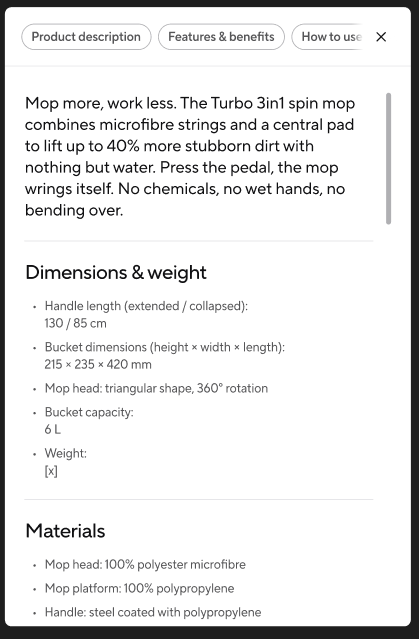
An information row in the product selector on product detail pages, and only there. Unlike the generic accordion, a row does not expand in place: clicking it opens a shared overlay in which every row title becomes a tab pill, so visitors can switch between the topics: product description, features and benefits, and how to use and care.
| Field | Field ID | Type | Req. | Loc. | Rules and allowed values | Notes for editors |
|---|---|---|---|---|---|---|
| Market | vileda | JSON object (app) | Yes | No | Set through the Market field app. | Assigns the entry to the market or markets it belongs to. Mandatory on almost every content type – pick the markets in the app interface rather than editing the JSON. |
| Internal Name | internalName | Short text (Symbol) | Yes | No | Free text. | Editorial working title. Not shown on the website; it is the entry title in lists, search and reference pickers. Use a clear, consistent pattern, e.g. “PLP | Mops | Highlight Card”. |
| Title | title | Short text (Symbol) | Yes | Yes | Free text. | Row label. The position in the Accordions list of the Product Detail Page decides the section: the first entry is always titled “Product description”, the second “Features and benefits”, the third “How to use and care”. This is also the entry title in Contentful. |
| Content | content | Rich text | Yes | Yes | Headings 2–6, ordered and unordered lists, horizontal rule, bold, italic, underline. Links to URLs and Page entries. Embedded blocks: Media Test, Document and Link entries plus assets. Inline entries: Media Test. | The row body. Embed a Document entry to offer a manual or data sheet as a download. Heading 1 is intentionally unavailable – the page headline is the only H1. |
Editorial notes
- The title is both the row label and the tab pill in the overlay – keep it short.
- A row with no content is hidden automatically; you do not need to delete it to hide it.
- The long product description at the top of the description overlay comes from SAP Commerce and cannot be edited here.
- Row order is set by the Accordions list on the Product Detail Page, not on the accordion itself.
- A product detail page takes at most three PDP Accordion entries, in the fixed order of the three topics above.
2. PLP Highlight Card
Name in Contentful: 🛒 PLP Highlight Card Content type ID: plpHighlightCard Entry title: internalName
Specification:CS-373 (To Do)
Places an editorial card inside the product grid of a listing page, so a category page can carry content alongside the product data coming from SAP. The card is injected at a chosen slot in the grid.
| Field | Field ID | Type | Req. | Loc. | Rules and allowed values | Notes for editors |
|---|---|---|---|---|---|---|
| Market | vileda | JSON object (app) | Yes | No | Set through the Market field app. | Assigns the entry to the market or markets it belongs to. Mandatory on almost every content type – pick the markets in the app interface rather than editing the JSON. |
| Internal Name | internalName | Short text (Symbol) | Yes | No | Free text. | Editorial working title. Not shown on the website; it is the entry title in lists, search and reference pickers. Use a clear, consistent pattern, e.g. “PLP | Mops | Highlight Card”. |
| Card | card | Reference (entry) | Yes | No | Content Card entries only. | The card content. Reuse an existing Content Card where one fits instead of creating a near-duplicate. |
| Position | position | Integer | Yes | No | Whole number, minimum 1. | 1-based slot in the product grid where the card is injected. Avoid giving two cards the same position on one page. |
Editorial notes
- Position is a whole number starting at 1; Contentful does not check whether two cards claim the same slot.
3. Sub-Category Card
Name in Contentful: 🛒 Sub-Category Card Content type ID: subCategoryCard Entry title: internalName
Specification:CS-158 (QA Testing on S1)
One card in the sub-category slider above the product grid of a listing page. It carries a label, a thumbnail and a link to the corresponding sub-category page and guides shoppers deeper into a category.
| Field | Field ID | Type | Req. | Loc. | Rules and allowed values | Notes for editors |
|---|---|---|---|---|---|---|
| Market | vileda | JSON object (app) | Yes | No | Set through the Market field app. | Assigns the entry to the market or markets it belongs to. Mandatory on almost every content type – pick the markets in the app interface rather than editing the JSON. |
| Internal Name | internalName | Short text (Symbol) | Yes | No | Free text. | Editorial working title. Not shown on the website; it is the entry title in lists, search and reference pickers. Use a clear, consistent pattern, e.g. “PLP | Mops | Highlight Card”. |
| Label | label | Short text (Symbol) | Yes | Yes | Free text. | Card caption – normally the sub-category name. |
| Image | image | Reference (entry) | Yes | No | Media or Image entries. | Card visual. Use a consistent crop across all cards of one slider. |
| Target | target | Reference (entry) | Yes | No | Page entries only. | The page this card navigates to – normally the sub-category listing page. |
Editorial notes
- All three fields are mandatory: label, image and target page.
- The target must be a Page entry, so the sub-category page has to exist before you can link it.